Haunted by Kids Mouse Pad: Spooky Sublimation Designs for a Productive Desk
Your workspace is more than just a physical area—it’s a reflection of how you work, think, and recharge. Every element, from the chair to the lighting, plays a role in your daily output. Often overlooked, the humble mouse pad is one of those touchpoints that affects both comfort and precision. The Haunted by Kids Mouse Pad collection brings together playful Halloween aesthetics with sublimation-ready digital files, allowing you to customize a functional desk accessory that sparks joy and keeps you focused. This article walks through exactly how these designs fit into real workflows, whether you’re printing them yourself, commissioning a production run, or planning a seasonal product line.
Understanding the Haunted by Kids Mouse Pad Collection
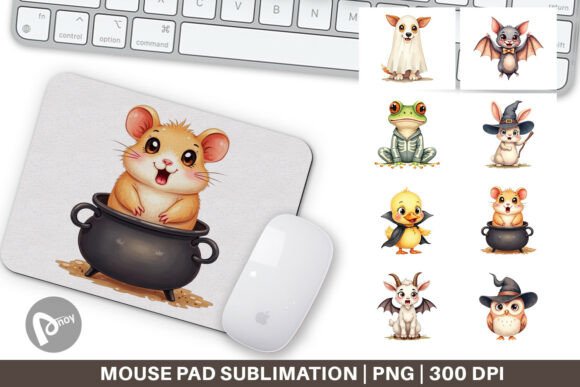
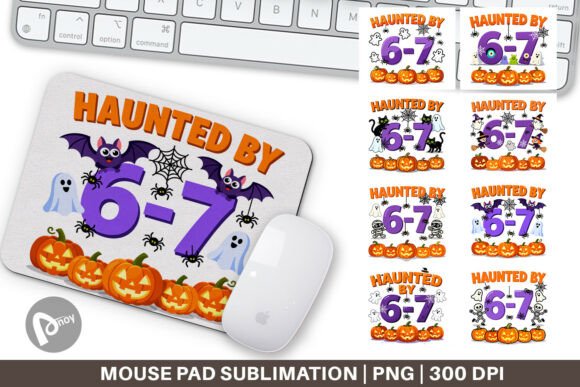
At its core, this collection is a set of eight PNG files designed specifically for sublimation transfer onto white polyester mouse pad blanks. Each file measures 9.5 x 8.1 inches at 300 DPI—a resolution that ensures sharp, clean edges and vibrant colors when applied to a standard-sized mouse pad. The designs lean into playful, spooky imagery that works well for both personal use and small-batch production. Because these are digital assets, they fit naturally into a broader creative process: you receive the files, load them into your sublimation workflow, and produce a finished product that matches the exact look you want.
For anyone who runs a design business, a print-on-demand side hustle, or simply enjoys upgrading their own workspace, this collection removes the need to create original artwork from scratch. Instead, you focus on preparation, material selection, and the actual transfer process—saving hours of illustration time while still delivering a unique, high-quality result.
File Format and Sizing Checks
Before you even open your sublimation software, take a moment to verify the file specifications. The provided PNGs are already set to 9.5 x 8.1 inches at 300 DPI. This matches a common mouse pad blank size (roughly 9" x 8" or slightly larger), so you won’t need to resize or crop. However, always measure your actual blank: some manufacturers have slight variations in the pad’s top layer. If your blank is larger, you can scale the design proportionally inside your printing software, but avoid exceeding the DPI threshold. Dropping below 200 DPI can result in a blurry transfer, especially with intricate outlines or text elements that some of these Halloween designs include.
Software and Printer Compatibility
These PNG files work with any program that accepts standard image formats—Adobe Photoshop, CorelDRAW, Affinity Photo, or even free tools like GIMP and Canva. If you use a dedicated sublimation package like Sawgrass Print Manager, simply import the PNG and set the print size to 100% scale. For CMYK conversion: sublimation printers typically use CMYK inks, and your software should handle the color space automatically. Still, it’s good practice to view the design on a calibrated monitor and, if possible, print a small test swatch on plain sublimation paper to check color balance. The Haunted by Kids designs feature a mix of purples, greens, and blacks; these dyes often shift slightly on polyester. A quick test sheet saves wasted blanks and ink.
Before a Project: Set the Mood for Creative Work
Starting a design or writing task can feel like stepping onto a blank stage. A visually engaging mouse pad acts as a subtle anchor—something that reminds you of the season or theme you’re working within. For a graphic designer who handles Halloween campaigns each year, placing a spooky-but-whimsical mouse pad on the desk before client work begins functions as a psychological prompt. It signals that you’re entering a focused, playful mindset. Simply swap in the pad a few minutes before opening your software; the tactile and visual cue helps shift gears without extra effort.
During Task Execution: Comfort and Precision
Mouse pads aren’t just decoration—they directly affect cursor control and wrist fatigue. A smooth, consistent surface reduces friction, so every click and drag feels deliberate. When you’re in the middle of a long editing session or navigating complex dashboards, the last thing you want is a cheap pad that causes your mouse to stutter or your wrist to slide awkwardly. Sublimated mouse pads from this collection offer a full polyester surface that supports both optical and laser mice with steady tracking. The slightly padded underside also cushions the forearm, which matters if you spend four or more hours at a desk each day. The playful design becomes a bonus, but the usability remains the priority.
After a Task: A Small Reward and Clear Transition
Finishing a project—whether it’s a report, a design revision, or a week of client work—deserves a gentle high-five. Customizing your own mouse pad with a design you love can be that small reward. And because sublimation is permanent, the pad stays clean and vibrant for months. When you switch tasks, simply glancing at the pad (or touching its smooth surface) can signal closure: “That work is done, now I move on.” In practice, many creatives use themed pads seasonally. The Haunted by Kids collection fits October, but the designs are open-ended enough that some users keep them on the desk year-round. The choice is yours, and the process supports both approaches.
Workflow Examples for Entrepreneurs and Small Businesses
If you run a print-on-demand shop or produce custom goods for local markets, these designs become product inventory. Here are three common scenarios where the collection integrates smoothly into your business process:
- Seasonal Pop-Up Prep: A month before Halloween, order blank mouse pads in bulk. Print the Haunted by Kids designs in batches. Package with care instructions and sell at craft fairs or Etsy. Because the files are ready to go, you can produce twenty units in a single afternoon.
- Client Customization: A customer wants a mouse pad for their home office but likes the “haunted but not scary” look. You show them the collection, they pick one, and you sublimate it with their name or logo added in a corner. The existing artwork provides a solid base, and you only need to overlay text or a small logo—no full redesign required.
- Subscription Box Insert: Some businesses run monthly desk accessories boxes. Including a limited-edition mouse pad from this collection adds value and encourages repeat purchases. Coordinate the delivery with October or a “spooky season” theme. The PNG files make it easy to produce exactly the number needed without leftover inventory.
Heat Press Settings and Blank Selection
Sublimation mouse pads typically consist of a polyester top layer and a foam rubber base. The key is to transfer the design at around 385°F (195°C) for 45 to 60 seconds with medium pressure. Place the printed transfer face-down on the pad, tape the edges, and cover with a Teflon sheet to prevent ghosting. Because the Haunted by Kids designs include both dark and light areas, ensure your press is evenly heated. Uneven temperature can cause color shifts—especially in the purple tones—which may alter the intended playful mood.
Color Management for Consistent Results
Each screen shows colors slightly differently. When you first print a design, compare it to your monitor. If the orange looks too red or the green appears muddy, adjust your printer profile or tweak the saturation in your design program. It’s normal to run one or two test prints on scrap sub paper before committing to a batch. Keep a log of the settings that produced the best results so you can repeat them later. Over time, you’ll build a reliable baseline for any sublimation project coming from digital file packs like this one.
Quality Control at Scale
When producing ten or more mouse pads, inspect each after pressing. Look for:
- Sharpness of edges (the design should align neatly with the pad borders)
- No visible white spots (unpressed areas) near the center or corners
- Consistent color density across all units
- Clean back surface (no dye migration to the foam layer)
If you catch a defect early, you can re-press a bad unit before the transfer sets completely. Sublimation dye gases fade quickly, so speed matters—but rushing increases mistakes. A deliberate rhythm with a dedicated jig or alignment frame helps maintain quality across multiple prints.
Long-Term Use and Desk Ergonomics
A well-made sublimation mouse pad holds up to daily use for many months. The dye is embedded in the polyester fibers, so it won’t peel or fade with normal mouse movements. However, edges can begin to fray if the blank has a raw cut border. Choose blanks with stitched or overlocked edges for durability. To clean, simply wipe the surface with a damp cloth—no harsh chemicals needed. The playful Haunted by Kids design remains bright even after repeated cleaning.
From an ergonomics standpoint, any quality mouse pad supports a neutral wrist position. The slight cushion reduces contact stress. Combined with a desk of proper height, a mouse pad like this becomes a low-cost upgrade that pays off in reduced discomfort during long project sprints. If you switch between a mouse and a trackpad, the pad still serves as a textured space for your hand, preventing the palm from sticking to the desk.
Adapting the Design for Different Use Cases
These files are not limited to standard rectangular mouse pads. The PNG dimensions are rectangular, but you can crop or mask them in software to fit round or angled blanks if you’re comfortable adjusting the artwork. Some users print on larger desk mats (11 x 17 inches) by scaling the design—though note that resolution drops if you go too big. For a full desk mat, consider repeating the pattern or using one element as a corner accent. The Haunted by Kids collection works especially well as a centered focal point on a smaller mat, or as a strip along the edge of a larger mat if you design your own layout.
Freelancers and educators often customize mouse pads for clients or students. A teacher might print these designs for a classroom computer station, adding a “Halloween Writing Center” label. A blogger could use the pad as a backdrop in product photos, creating a cohesive spooky aesthetic for social media. In every case, the process remains the same: prepare the file, print, press, and deliver.
Why Process-Oriented Users Choose Digital Sublimation Packs
Anyone who values repeatable, consistent output knows that pre-made design packs replace the unpredictable step of original creation with a controlled, measurable production step. The Haunted by Kids Mouse Pad collection does exactly that: you no longer need to conceive, sketch, and refine a Halloween theme. Instead, you select from eight options, verify print settings, and execute. This shift from “design” to “production” streamlines your workflow and lets you focus on volume, quality checks, and customer interaction. For small business owners and productivity-minded individuals, that’s a direct efficiency gain.
Moreover, using themed designs on a functional object like a mouse pad creates a natural conversation starter. Clients and colleagues notice a custom pad, which can lead to additional orders or interest in your services. The pad itself becomes a subtle marketing tool—especially if you include your business logo or website on the edge (which you can add in your editing software before printing).
Bringing It All Together
The Haunted by Kids Mouse Pad and Sublimation Mouse Pad design set offers more than just a seasonal decoration. It provides a practical asset for anyone who prints custom merchandise, personalizes their own workspace, or wants to introduce a touch of personality into a strict daily environment. By integrating these files into your preparation, printing, and quality control steps, you gain a repeatable process that saves time and delivers attractive results. Whether you produce one pad for your home office or fifty for a Halloween market, the workflow remains the same—download, print, press, and enjoy a desk that reflects your style and supports your productivity.
Start with the file, think about your blank material, and move step by step. That’s how you turn a digital design into a real, useful object that makes every mouse movement a little more satisfying.